
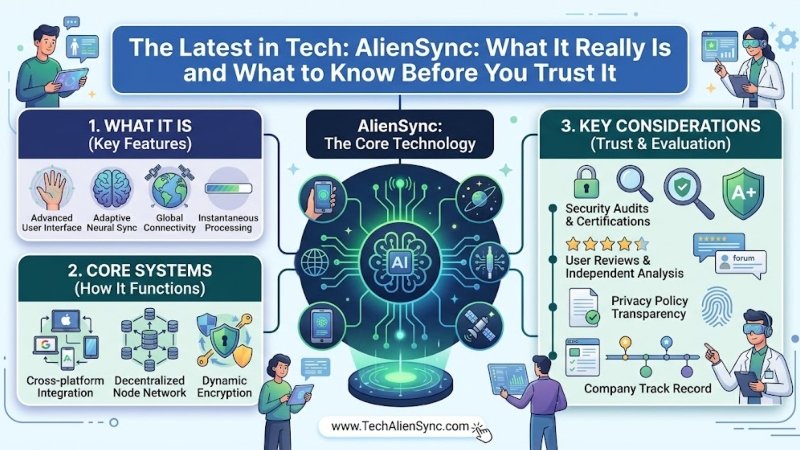
If you searched for “the latest in tech AlienSync,” you probably expected to find a clear answer: a new app, a gadget, or a software platform. Instead, you likely found a pile of articles that all use the same name but describe very different things. One calls it a business data tool. Another calls it a way to link your phone, laptop, and smart home. A third calls it an app that connects your emails, calendars, and social media. This guide walks you through what is commonly claimed, what can and cannot be confirmed, and how to read this kind of tech content safely, in plain language.
Quick Answer
- What is AlienSync? The name is used online for synchronization (“sync”) technology, meaning tools that keep apps, devices, or data connected and up to date.
- Is there one official AlienSync product? We could not confirm one. None of the articles we reviewed name a developer, company, founder, version number, price, or official download.
- Do the articles agree? No. Different pages describe it in three different ways (see below).
- Should I download or pay for it? Not based on these articles alone. Verify the maker and the source first.
Three Different Stories About the Same Name
| Version of the story | What it says AlienSync is | What it claims |
|---|---|---|
| Business integration | A layer of software that connects different business apps such as CRM, helpdesk, analytics, and older databases | Less manual data entry, automated workflows, encryption, and compliance with privacy rules |
| Device synchronization | A framework that makes phones, laptops, and smart-home devices share information and work together | Very fast response between devices, strong security, and smart-home control without the cloud |
| Productivity and social hub | An app that links your email, social media, calendar, and tasks in one place | Free and premium versions, task automation, and a central dashboard |
All three describe the same general idea: connecting things that normally sit apart. But they describe different products, for different users, with different features. A real software product usually has one clear description on its own website. When one name is explained in three ways by pages that do not link to any official source, it is a sign the name is mostly being used as a search keyword.
What We Could Not Confirm
To be honest and useful, here is what is missing from the articles we reviewed:
- No named company or developer. Nobody says who builds or sells it.
- No official website or download page is linked in the articles.
- No pricing, version, or release notes. Some articles mention free and premium plans or a launch date but give no details.
- No independent reviews, benchmarks, or tests. Speed and performance numbers are given without a method, and some numbers contradict each other within the same article.
- No customer names. The success stories mention people like “Sarah” or “a Berlin team” with no company or proof.
- Security and compliance claims are not backed up. Claims about encryption, two-factor login, or meeting rules such as GDPR and HIPAA are stated without certificates, audits, or documents.
Several of these pages are also hosted on unrelated websites, such as a pharmacy library, a school site, and a business site, which have no connection to technology. That pattern often points to mass-produced, search-driven content rather than reporting about a real product.
What “Sync” Technology Actually Is
Even if the name is unclear, the idea behind it is real and useful. Here is what sync tools generally do:
- Keep data matching. When you change something on one device or app, the change appears on the others.
- Remove repeated work. Instead of typing the same information into three programs, you enter it once.
- Trigger actions automatically. For example, a new form submission can create a task, send an email, and update a spreadsheet.
- Resolve conflicts. If two people edit the same item, the system decides which version to keep or asks you to choose.
These are all real categories of technology. Businesses often use integration and automation platforms to connect their apps. Everyday users rely on cloud sync for photos, notes, passwords, and files. Smart-home systems use standards that let devices from different brands work together.
Real Tech Trends Behind the Buzz
Some of the technical terms that appear in AlienSync articles are real and worth understanding on their own:
- Faster wireless networks. Newer Wi-Fi standards such as Wi-Fi 7 can connect devices over more than one band at once, which helps with speed and stability.
- Ultra-wideband (UWB). A short-range radio technology that helps devices know how close they are to each other. It is used in some phones, car keys, and tracking tags.
- AI-assisted data mapping. Software can now suggest how fields from one system match fields in another, which saves time during setup.
- Event-driven automation. One action in an app can automatically start several others.
- Zero-trust security. A security approach where every device and user must prove who they are each time, rather than being trusted by default.
These ideas are genuine, but when a page lists them next to a product name it cannot verify, the technical words do not prove the product exists.
How to Spot Unreliable Tech Content
You can use this checklist for any “latest in tech” article, not just this one:
- Is a company or developer named? Real products have makers.
- Is there an official website? You should be able to find the product’s own page and documentation.
- Are there specific details? Look for version numbers, supported devices, and pricing instead of general praise.
- Do the numbers agree? If one page gives two different speed figures, be careful.
- Are there sources? Studies, statistics, and quotes should link to where they came from.
- Does the site fit the topic? A technology article hosted on an unrelated website deserves a second look.
- Is the tone mostly marketing? Phrases like “game-changer,” “revolutionary,” and “unparalleled” with no evidence are a warning.
Safety Tips Before You Download Anything
- Only download software from the developer’s official website or a trusted app store.
- Check reviews from independent sources, not only from the page offering the download.
- Read the privacy policy before connecting your email, calendar, or social accounts.
- Never give a new app access to your accounts unless you are sure who runs it.
- Use two-factor authentication on important accounts.
- Start with a free trial or a test account, not your main data.
- If an offer promises “exclusive deals” or “free access” but gives no company name, do not enter payment details.
Better-Known Alternatives
If you want to connect your apps or keep your devices in sync, several established options are available. Built-in cloud sync from your phone or computer maker can handle photos, files, and notes for personal use. To automate tasks between web apps, you can explore services such as Zapier, Make, and similar integration tools. Businesses can also choose larger integration platforms with published security and compliance information. Before choosing a service, check its current features and pricing on the provider’s official website.
Final Thoughts
“AlienSync” is a good example of how a catchy name can spread across the internet faster than any real product behind it. The idea it points to, keeping your apps, devices, and data connected, is real and valuable. But the articles about AlienSync itself do not give you a company, a download, or proof you can check. The smart move is simple: enjoy learning about sync technology, but verify the maker and the source before you install, pay for, or connect your accounts to anything with this name.
Frequently Asked Questions
What is AlienSync?
The name is used online for synchronization technology, described variously as a business data integration tool, a device-sync framework, or a productivity app. No single official product was confirmed.
Who makes AlienSync?
None of the articles we reviewed name a developer or company.
Is AlienSync free?
Some pages mention free and premium versions, but none shows pricing or an official sign-up page.
Is AlienSync safe?
There is not enough verified information to say. Claims about encryption and compliance are not backed by documents. Be careful with downloads and account permissions.
Can AlienSync connect my phone, laptop, and smart home?
Some articles say so, but without proof. Built-in ecosystems from major device makers and standards-based smart-home systems already offer this and are better documented.
Is AlienSync a good tool for small businesses?
Some articles say it is, but they give no customer examples or pricing. Small businesses are better off using integration tools with clear pricing, support, and reviews.
Why are there so many articles about AlienSync?
The keyword is popular in search, and many sites publish similar, general content to rank for it. Many of those pages do not link to any official source.
How can I check if a tech product is real?
Look for an official website, a named company, documentation, independent reviews, and an app store or download page you can verify.

Writer & Editor, UnderstandingBlogs
Luke David is a Writer & Editor at UnderstandingBlogs. He creates clear, research-based content on technology, AI, business, entertainment, and public figures. His work focuses on accurate facts, simple explanations, and useful insights readers can trust. Every article is carefully reviewed and fact-checked before publication.